Ontology of Tags
Business and technical stakeholders, both within and outside the CSEs, need a common vocabulary to describe different perspectives of IT and cybersecurity within the national cyberspace. This section defines an ontology of tags that categorises various characterstiscs of a federated digital ecosystem. The tags will enable a common specification, representation and communication of the use of IT and cybersecurity amongst the governing bodies, top and senior management and technical teams, both within entities and the external organisations interacting with the entities.
Three tag-groups are defined, as under:
A. Resource categorisation
B. Hierarchical level
C. Trust level
The ontology is designed in a technology-agnostic manner so that it can understood by both business and technical persons. The tags are meant to be used in architecture diagrams and presentations to give the business and technical management a common mechanism to specify the characteristics of IT and cybersecurity elements in the federated digital ecosystem. They are also to be used in discussions with external organiations. The objective is to facilitate common understanding of situations and enable appropriate decision-making.
A. Resource Categorisation Tags
The resource categorisation tags are designed for use by the technology level practitioners to establish a common understanding with the goveranance and business levels about the type and level of control they have over their information infrastructure elements. The list of tags in this group are as under:
- Resource zones - central (S) or end-user (U).
- In-use resources purpose and use – functional (FS, FU) or governance/ management/ administration (GS, GU).
- Connectivity zones (V).
- Data centre ownership (SA, SB, SC, SD).
- Connectivity ownership (VA, VB, VC, VD).
- Connectivity purpose and use (XA, XB, XC, XD).
- End user resource ownership (UA, UB, UC, UD).
- End user role (NU, OU).
- Control over human workforce (WA, WB, WC, WD).
- Services (DC, IS, OS, TS, SS, FM).
- Service ownership (JA, JB, JC, JD).
- Data centre segmentation (ML1 to ML4).
- Cloud services segmentation (YL0 to YL4)
Resource Zones
The resource zones are of two types:
Central Resource Zones (S Zones): These zones host the in-use operating resources (servers, applications, databases) of different business processes and management systems, as well as the local networking and security infrastructure. The central zones are located physically within the data centres or the local server rooms in regional/ branch offices. These zones are tagged as System or ‘S’ zones.
End User Resource Zones (U Zones): These zones host the in-use operating resources (computing devices, applications, data repositories) of end users and their local networking and security infrastructure. The users may be human or machine and are typically identified by their credentials (user and machine ids) that are linked to centrally managed user and system accounts. The user zones are generally located physically within the office premises of organisations or work/ home premises of remote users. These zones are tagged as User or ‘U’ zones.
In-Use Resources
Computer resources (assets) of entities may lie in the store or be deployed for use. The resources deployed and in-use in central and end-user zones can be categorised as under, based on their purpose and use. The tags are derived from the primary tag ‘S’ or ‘U’:
| Tag | Resource Use Type | Resource Use Description |
|---|---|---|
| FS, FU | Functional Use | The resources are used for business functions, services, operations, and analytics. These include computer resources (web servers, app servers, db servers, etc) of different critical business/ industrial processes. |
| GS. GU | Governance, Management and Administration Use | The resources are used for governance, management, and administration. These include computer resources to configure, manage, monitor, control, analyse and report the functional, performance and cybersecurity aspects of the computer resources deployed in the operational zones. |
Notes:
Typically, the resources used for operational and management functions are physically and logically segmented into separate sub-zones within the hierarchical levels described in later sections.
The in-use computer resources (assets) of an organisation can be categorised and tagged based on their functions and capabilities, as well as by the zones in which they are deployed. The tags can be used to apply detailed guidance on the information security imperatives and requirements of each in-use resource based on its function and the zone in which it is deployed.
Types of Functional Resources (FS, FU Tag)
The detailed categorisation of computer resources based on the functions and capabilities is described in a separate section. The in-use computer resources can usually be tagged as under.
End User Resources:
- User and machine credentials stored in smart cards, USB tokens or 2FA through mobile devices.
- Endpoint computing devices (desktop, laptop, tablet, mobile)
- Audio and video conferencing devices
- Wired and wireless network access devices, Bluetooth, Zigbee, WLAN
- SSL VPN termination, VPN clients
- Applications and data repositories
- Endpoint agents installed on compute devices.
Cloud Services and Resources:
- Subscription Services: Cloud Access Security Broker (CASB), As-a-Service Applications (email, portal, eOffice etc), CTI Feeds.
Perimeter Devices:
- Perimeter zones will have connectivity devices that provide physical and logical conduit between the two zones and physical (human) and logical (network) ingress/ egress control devices (gateway), data diode.
- Firewall, IDS, IPS, UTM, NAC appliance, Router, switch, VPN gateway, SSL terminator, communication network termination device, OT: GPRS modem, FO modem, smartcard/ biometric readers, network taps, IPSEC/ SSL VPN termination points.
Data Centre Resources:
- Web Proxy, Email Proxy, API gateway, Load Balancer, Data Leakage Protection, Content Disarm & Reconstruct (CDR), Switch
- Enterprise Zone Data Centre (segmented into multiple trust zones (VLANs), based on functional and security design): server cluster, server farm, VMs and containers, storage, consoles, SW stack, business systems (ERP)
- Datacentre network (DCN), compute, VMs and containers.
Zones specific to OT and IIoT:
- OT supervisory L2: Industrial PCs, SCADA, DCS, HMI, FEP, Historian, Engineering Workstation, switch
- OT basic control L1: PLC, RTU, IED, BCU
- IIoT edge devices L1: surveillance cameras, biometric and smart card readers
- OT L0: relay, sensor, actuator, generic OT process devices
Types of Governance and Management Resources (GS Tag)
These resources can be broadly categorised as:
- Platforms that discover, provision, configure, monitor, manage functionality, performance, and security, visualise, control, analyse, govern, and report the trustworthiness (functionality and assurance) of operational systems (computer resources).
- Cloud Services Management (Infrastructure, Platforms, Software, Security, Backup, BCP, DR services), Domain management, SMIME/ SSL certificate management, email, and web services.
- Subscription feeds: OEM Patches and Feeds, OEM telemetry collectors, AV/ EPP management, Domain manager, Certificate Authority, OAuth IdPs.
- Datacentre network (DCN) management: physical access control, CCTV monitoring, BIMS, UPS & Generators DNS, DHCP, RADIUS, network access control (NAC) management.
- Management platforms and tools: IT/OT asset management (ITAM), asset configuration management (CMDB), asset discovery, IdAM (AD) & privileged identity and access management, LDAP, credential management, API secrets management, certificate management, NMS/EMS, patch management, vulnerability & compliance management, database activity monitoring (DAM), key lifecycle management (KLM), policy management, SSH management, log & flow collectors, SIEM, EDR, NDR, XDR, SOAR, endpoint/ AV protection (EPP), forensic tools, ITSM, ISMS, BCMS, data backup.
- Log collection from all in-use computer resources and flow collection from all networks.
Connectivity Zones
These zones host the Wide Area Network (WAN) network provider infrastructure that provide the conduits for voice, video, and data connectivity between the resource zones. The connectivity zones are usually owned and managed by TSPs and ISPs and are accessed by means of customer premises equipment (CPE) that are installed in the resource zones connecting to the WAN. These zones are tagged as ‘V’ zones, say Connectivity Zone.
The connectivity (V) zone of an entity is, in effect, a resource (S) zone of the TSP and ISP.
Data Centre Ownership
All data centres and server rooms hosting the central resources are categorised as under, based on their ownership. The tags are derived from the primary tag ‘S’:
| Tag | Data Centre Type | Data Centre Description |
|---|---|---|
| SA | Entity Owned | Captive data centres and server rooms owned by the entity. |
| SB | GOE Owned | Data centres of Govt Owned Entity (NIC, SDCs, PSUs). |
| SC | Privately Owned | Data centres of Privately Owned CSP, India based DC facilities. |
| SD | Privately Owned | Data centres of Privately Owned CSP, multi country DC facilities. |
Notes:
The above categorisation helps the governing bodies and top management of entities to evaluate the governance, risk and compliance aspects of data centre and cloud service providers, while providing strategic direction to the use of IT. For example, the risk of non-compliance of data localisation requirement is higher in the case of Type SD as compared to Type SC.
Tag SA entity owned private cloud is exclusive to the organisation, which may be hosted on-premises or in a site hired from a property owner. This corresponds to the pattern where an organisation provides its own captive cloud services.
Tag SB GOE owned cloud is typically mandated for almost all the critical business functions of CSEs. Many common services like email, portals, eOffice and other IaaS/ PaaS/ SaaS/ DRaaS are provided as cloud services to the Govt Community.
Tag SC private cloud service providers with India-only data centres are easily able to comply with data localisation requirements that can be verified using lower levels of audit effort. Such CSP data centres are preferable when data localisation requirement as well as control over data storage outside of India is of high priority.
Tag SD private cloud service providers with multi-country data centres include the i) the likes of global CSPs like AWS, Azure, GCP, IBM, Oracle, SAP; ii) OEM service management related to OEM patches, vulnerability feeds and sending system telemetry back to the OEMs, specifically relevant to OT OEM support services that are provided from OEM support cloud installations.; iii) third-party managed services (MSPs and MSSPs) covering both Indian and non-Indian ownership and control; iv) content delivery network (CDN) providers; v) domain name providers, digital certificate issuers, PKI management providers like DigiCert, DNS and other security service providers like Cloudflare etc.
The key advantages of tag SD CSPs are that they can provide very high levels of infrastructure scaling, availability, and business continuity. A large pool of trained and experienced professionals is also available for such CSPs, and these professionals can be easily hired to manage and secure the zones implemented in these CSP data centres. These CSPs can comply with data residency within the Indian geography but cannot easily prove compliance that data is not also residing outside of India. Significant audit effort is required to verify the same. Hence, such CSP data centres are relevant when an organisation requires very high and dynamic scalability or has to provide its services beyond the national boundaries or when there are no major concerns related to copies of data being stored outside of India.
Connectivity Ownership
These zones host the Wide Area Network (WAN) network provider infrastructure that provide the conduits for voice, video, and data connectivity between the resource zones. These zones are tagged as ‘V’ zones.
The connectivity providers are categorised as under, based on their ownership. The tags are derived from the primary tag ‘V’:
| Tag | Connectivity Type | Connectivity Description |
|---|---|---|
| VA | Entity Owned | Captive WAN and mobile networks owned by the entity. |
| VB | GOE Owned | WAN and mobile networks of Govt Owned Entity (NICNET, NKN, PSUs). |
| VC | Privately Owned | Networks of Private TSP/ ISP, managed from India based facilities (Airtel, Reliance, Vodafone-Idea). |
| VD | Privately Owned | Networks of Private TSP/ISP managed from outside India. Example, global satellite communication providers. |
Notes:
The above categorisation helps the governing bodies and top management of entities to evaluate the governance, risk, and compliance aspects of connectivity providers (TSPs/ ISPs), while providing strategic direction to the use of IT. For example, the national security risk due to misuse of the monitored traffic patterns is higher in the case of Type VD as compared to Types VA, VB, or VC.
Connectivity Use
The connectivity can be categorised as under, based on the purpose and use. The tags are derived from the primary tag ‘X’, to identify the network topography:
| Tag | Characteristics of Connectivity |
|---|---|
| XA | Closed user group (CUG). |
| XB | Intra-organisation: Intranet (WAN), local area network (LAN), data centre networking (DCN). |
| XC | Inter-organisation: Extranet (WAN). |
| XD | Public: Internet. |
Tag XA is typically used for high security closed user groups, which use captive networks or encryption devices on less secure networks. Entities also use VPN to create closed user groups for privileged users, who typically have to connect to the data centres to provide remote support.
Tag XB is typically used for intranet connectivity of regional and branch offices through MPLS Cloud, Leased Lines or Site-to-Site VPNs. This also includes remote OT cells/ areas within an OT Site that typically connect to the OT site operations/ DMZ on wired LAN.
Tag XC is typically used for extranet connectivity through MPLS Cloud, Leased Lines or Site-to-Site VPNs. Examples are RBI Infinet, NIC NKN, Power sector grid operation networks between substations and control centres etc.
Tag XD is typically used for internet connectivity through wired/ wireless broadband and mobile networks provided by the Internet Service Providers (ISPs).
End User Resource Ownership
The end user resource ownerships are categorised as under, based on the organisation to which the human user or machine belongs. The tags are derived from the primary tag ‘U’:
| Tag | User Org Type | User Organisation Description |
|---|---|---|
| UA | Own Organisation | Human user or machine belongs to the entity itself. |
| UB | Other Organisation | Human user or machine belongs to another entity with which there is a formal and established relationship. |
| UC | Other Organisation | Human user or machine belongs to another entity with which there is no formal or established relationship. |
| UD | No Organisation | Human user or machine does not belong to any entity, viz a private individual or his machine. |
Notes:
The above categorisation helps
- the design and implementation teams and the operations managers to establish and ensure appropriate controls in different end user zones.
- the top and senior management to monitor the risks.
- the audit teams to check policy non-compliances.
Entities have a high level of control over tag UA resources, whether they are used for connecting through the Internet or Intranet. The organisation can enforce that the end-user devices must have adequate endpoint protection (AV, anti-malware etc) and comply with organisational policies (patches/ updates, upgrades, password policy enforcement, authorised applications, VPN usage etc). These controls can even be enforced and centrally managed on the Bring Your Own Device (BYOD) of remote workers.
Entities have a lower level of control over tag UB, UC resources that belong to other Organizations. In most cases, the user’s organisation is responsible for configuring, securing, and managing the end user resources. Other organisation’s users (humans and machines) typically connect to one’s own organisation’s information infrastructure through the Extranet. Other organisation users may also connect using IPSEC or SSL VPNs over the Internet. One’s own organisation must depend upon the other organisation’s policies and processes of control over the end-user devices in terms of their endpoint protection and compliance to policies. Formal and established relationships between entities help to increase the trust in the human users and machines of the other entities.
Entities do not have any control over tag UD resources, the end-user devices of public users, who connect to organisation’s information infrastructure through the Internet, typically using browser or mobile applications. Machine to machine connections from public users/ Organizations to an organisation’s systems are generally API-based.
End User Role
The end user resources are categorised as under, based on the role of the human user or machine. The tags are derived from the primary tag ‘U’:
| Tag | User Role Type | User Role Description |
|---|---|---|
| NU | Normal User | Human user or machine carries out normal functions and activities. |
| OU | Privileged User | Human user or machine carries out privileged functions and activities. These include all types of administrators, service accounts, remote support providers etc. Business users with high levels of decision and approval powers can also be called privileged users. |
Notes:
End user zones with privileged users (OU) are a higher risk to the entity than those with normal users (NU) only. Such zones therefore need to be governed and managed with greater focus and may call for increased surveillance and compliance.
Privileged Users (OU) can be grouped as
- technical persons and machines (administrators, OEM remote support etc).
- business and special users accessing sensitive information (e.g., regulatory & statutory auditors).
Human Workforce Control
The human workforce for operating and managing the central resources and connectivity of entities are categorised as under, based on the entity’s level of control on the technical, administrative, physical and IT access control aspects of the workforce. The tags are derived from the primary tag ‘W’:
| Tag | Workforce Type | Workforce Technical, Administrative and Access Control |
|---|---|---|
| WA | Entity’s own employees | Technical functions: controlled by the entity Administrative functions: controlled by the entity Physical & IT access: controlled by the entity |
| WB | Workforce hired/ contracted by the entity | Technical functions: controlled by the entity Administrative functions: controlled by the HR supplier Physical & IT access: controlled by the entity |
| WC | Workforce of outsourced services providers (OEM Partners and SI Support Teams) | Technical functions: controlled by the service provider Administrative functions: controlled by the service provider Physical & IT access: controlled by the entity within the entity’s premises. |
| WD | Workforce of OEM and Managed Services Providers (providing remote services) | Technical functions, administrative functions and IT access to the entity resources are all controlled by the OEM or the Managed Services Provider (MSP, MSSP). Physical entry into the entity’s premises is not required for this workforce since all work is done remotely. |
Notes:
The technical functions related to the workforce covers aspects of skill assessment and verification during workforce hiring, tasking of individuals, leave management and management of replacements during leave or exit. This is done by the organisation themselves for resource categories WA and WB or by the service provider for resource categories WC and WD. Some Organizations also invest into the technical skill development of their WB resources (contractual employees).
The administrative functions related to the workforce covers aspects of skill verification and documentation during workforce onboarding, contract management, compliance to laws and regulation. This is done by the organisation itself for its own employees under resource category WA or by the resource/ service provider for resource categories WB, WC, and WD. Some Organizations manage the compensation payments and payment of GST for resource categories WB by themselves, while others let the workforce resource provider do the same.
The physical and IT access control of the workforce covers aspects of physical entry into the organisation’s premises and places of work within the organisation. It also covers access to IT and OT resources, both on-premises and remotely through the network. All Organizations control the physical access of people resources under resource categories WA, WB, and WC. The Organizations also control the IT access of people resources under resource categories WA, WB, and WC when they are on the organisation’s premises. In case of remote working of WC and WD category workforce, the service providers decide which person is assigned to remotely manage their customer organisation’s IT / OT infrastructure and further controls the IT access of the assigned resource as per the SLAs signed with the customer organisation.
The above workforce control categorisation helps the governing bodies and top management of entities to evaluate and provide strategic direction on the governance, risk, and compliance aspects of i) the workforce employed to operate and manage their central resources in data centres, and ii) the workforce employed by their outsourced and managed service providers (WC and WD).
For example, the risk of data leakage is higher from those providers of outsourced and managed services (WC, WD), who do not have good due diligence processes to hire, train and monitor their own and contractual employees, or they are further outsourcing the work to second tier service providers. Due diligence is especially important for workforce having privileged user (OU) rights.
A strategic assessment of the level of control available to an entity with regard to the outsourced workforce (WC and WD) operating and managing its resource and connectivity zones would help the entity identify the SLAs that should be in place with the outsourced and managed service providers. The SLAs should especially cover the control, monitoring, and oversight on the privileged users (OU) of the service providers since these highly skilled users generally work remotely.
Service Ownership
The modern federated digital ecosystem is largely driven by services. In general, a Service Provider Entity (SPE) delivers a service to a Customer Entity (CE), who acquires the service. The relationship between the SPE and the CE may be formal, semi-formal or informal, depending upon the type of service agreements that exist between them.
The services related to IT, OT and Information Security infrastructure are categorised as under:
- Data Centre Services (DC): These are typically provided by Cloud Service Provider Entities (CSP).
- Telecom and Internet Services (IS): These services include voice, video and data communication services that are provided by telecom and internet service provider entities (TSP, ISP).
- Operation Support Services (OS): These services include NOC, SOC, call centres, customer service centres etc.
- Technology Support services (TS): These services include L1 to L3 support services and managed services that are usually provided by second- or third-party entities such as OEMs and/or their partners, SIs, MSPs, MSSPs etc. These services are usually contracted with formal service level agreements between the customer (CE) and the service provider entity (SPE).
- Subscription services (SS): These services include all types of subscriptions and are typically in the form of cyber threat intelligence (CTI) feeds, vulnerability, and compliance (SCAP) feeds, open-source intelligence (OSINT) feeds, remote health monitoring service etc. These services may either be i) contracted by the CE with formal service level agreements with the SPE, or ii) non-contracted best effort services that have no formal SLAs between the CE and the SPE. The SPEs themselves may be source (feed) owners or feed aggregators.
- Non**-IT Facility Management Services** (FM): These services include power supply, site, and facility management (physical security, non-IT infrastructure) services etc.
In the modern federated digital ecosystem, the SPE and the CE may be different entities by themselves or may be different business units within large Organizations and the Government (e.g. NIC and SDCs are SPEs to govt departments (CEs)).
The SPEs are categorised as under, based on their ownership and location. The tags are derived from the primary tag ‘J’:
| Tag | SPE Type | Service Provider Entity Description |
|---|---|---|
| JA | Entity Owned | Services owned, managed, and consumed by the entity itself (captive). |
| JB | GOE Owned | Services owned, managed, and delivered by Govt Owned Entity. |
| JC | Privately Owned | Services delivered by Private SPEs from India based facilities. |
| JD | Privately Owned | Services delivered by Private SPEs from outside India facilities. |
Notes:
Tag JA SPE corresponds to the pattern where an entity has its own captive services.
Tag JB SPEs usually provide DC, IS, OS, TS, SS and FM services by government owned entities to CSEs.
Tag JC SPEs deliver their services from India based facilities.
Tag JD SPEs deliver their services from outside India facilities.
The above categorisation helps the governing bodies and top management of entities to evaluate the governance, risk, and compliance aspects of service provider entities, while providing strategic direction to the use of IT, OT, and Information security services. For example, the risk of disruption of service caused by changes in the local country regulations is higher in the case of type JD as compared to type JC, while it is very low for types of JA and JB.
Many Govt owned SPEs (tag JB) such as CERT-In, NCIIPC, CSIRTS etc provide Cyber Threat Intel feeds that are aggregated and enhanced by them.
Segmentation of Data Centres
It is evident that data centres and server rooms of entities are the most critical elements of an entity’s use of IT for achieving business objectives.
Data centre premises and contents can be segmented, based on the legal ownership of the i) physical property that hosts the data centre, usually managed by the property manager (FM-SPE), ii) the data centre facility or site itself, including the IT and non-IT infrastructure installed in the facility and owned by the Data Centre Service Provider Entity (DC-SPE), iii) supporting infrastructure of the facility (power, telecom, physical security) provided by the Facility Management Service Provider Entity (FM-SPE), and iv) platforms and services provided by the DC-SPE to the customers and users (CE). The segmentation levels are defined in the table below. The levels are prefixed with the tag ‘ML’.
| Tag | Segmentation Level Type and Description |
|---|---|
| ML1 | Physical property hosting the DC - buildings, civil infrastructure |
| ML2 | Physical DC site premises - IT and non-IT infrastructure |
| ML3 | Support facilities - power, telecom, physical security |
| ML4 | Customer owned resources within the DC – co-located resources and subscribed resources |
In almost all cases, the legal owners are responsible for the operations, management, security, legal and regulatory compliance functions of their segments. They are also responsible for the workforce handling these functions. For example,
ML1 is owned, operated, managed, and secured by the Property Manager (FM-SPE), who is responsible for ingress/ egress control into the property, campus security and safety. The workforce handling these functions are contract workforce (WB) or outsourced services (WC).
ML2 is owned by the DC-SPE and managed by the DC Site Manager, who is responsible for DC operations and management. The workforce handling these functions are a mix of the DC-SPE’s own employees (WA), contract workforce (WB) or outsourced services (WC).
ML3 is owned by the FM-SPE, who are responsible for operations and management of their services. The workforce handling these functions are a mix of the FM-SPE’s own employees (WA), contract workforce (WB) or outsourced services (WC).
ML4 is owned by the Customer Entity (CE), who is responsible for the operations and management of their platforms and subscribed services. The workforce handling these functions are a mix of the CE’s own employees (WA), contract workforce (WB) or outsourced services (WC).
In the case of entity owned data centres and server rooms (SA), the entity is both the DC-SPE and the CE. In case the entity also owns the inter-data centre and customer connectivity (VA), then the entity is also the IS-SPE for its intranet connectivity facilities.
In other cases (SB, SC, SD), there is a supplier and acquirer relationship between the DC-SPE and CE regarding the provisioning and use of cloud services. Cloud service customers can also consider multiple cloud service providers together as a cloud services supply chain.
The IS/ISO/IEC 27036: Part 4:2016 provides guidance on supplier relationship between the cloud service customer (acquirer) and the cloud service provider (supplier). IS/ISO/IEC 27002 clause 15 “Supplier relationships” provides controls, implementation guidance and other information for managing information security in supplier relationships. IS/ISO/IEC 27017:2015 provides guidelines on information security controls suitable for cloud services provision and usage, that can provide guidance to the DC-SPE and the CE. The DC-SPEs also obtain certification of compliance to various standards that are applicable to cloud services, such as IS/ISO/IEC 20000-1, SOC-2 etc. These standards are described in the compendium.
As per industry practice, the resource provisioning and orchestration functions are carried out by the DC-SPE. However, the responsibility of operation, management and security of customer subscribed data centre resources is shared between the DC-SPE and CE based on the type of cloud computing model that the CE has subscribed to from the DC-SPE. These are broadly classified into IaaS, PaaS, SaaS, XaaS etc. NIST SP 800-145, SP 500-292, and SP 500-332 provide detail guidance on cloud computing models.
Segmentation of Cloud Services
The cloud computing resource types given in the table below are adapted from the industry practice in a manner that it can also be applied to entity-owned captive data centres and GOE owned data centres. The tags are derived from the primary tag ‘Y’.
| Tag | Cloud Computing Resource Type & Description |
|---|---|
| YL4 | Function as a Service (backup, disaster recovery, virtual desktop, business continuity etc) |
| YL3 | Software as a service |
| YL2 | Platform as a service |
| YL1 | Infrastructure as a service |
| YL0 | Co-location service (using the data centre premises for locating customer resources) |
B. Hierarchical Level Tags
The hierarchical level tags are designed to provide a common classification mechanism for different zones of the information infrastructure. This will help the project design and engineering teams, procurement, and provisioning teams, IT and information security operations management teams and the service providers in better risk analysis and allocation of various resources. The tags in this group are as under:
- Central resource hierarchy of zones (HL0 to HL5).
- Perimeter zones between hierarchical zones (PHL1 to PHL4.5).
- Perimeter zones in data centre segments (PM1 to PM4).
- Perimeter zones in cloud environment (PYL0 to PYL4).
Central Resource Zones
The central resource zones can be categorised into different hierarchical levels, which correspond to the hierarchy defined in the Purdue Enterprise Reference Architecture (PERA) and other models. The hierarchical levels defined in the table below. The levels are prefixed with the tag ‘HL’.
| Tag | Hierarchical Level Type | Hierarchical Level Characteristics |
|---|---|---|
| HL5 | Enterprise Systems Zone | This level is physically or logically segmented into multiple operational, analytics and management zones, based on functional and security design. |
| HL4.5 | Enterprise DMZ | Typically, the DMZs are physically or logically separate for the Internet, Intranet and Extranet zones |
| HL4 | Enterprise Systems Zone | This level is physically or logically segmented into multiple operational, analytics and management zones, based on functional and security design. The tag may also be used to identify segmented IT operation zones and management zones inside the enterprise HL4 operations zone. |
| HL3.5 | OT Site DMZ Branch Office IT DMZ | The OT DMZs typically host systems for controlled exchange of data between the level 3 site operations zone and the organisation’s level 4 enterprise zones, as well as with control centres established by other Organizations. The IT DMZs function similar to level 4.5 enterprise DMZ |
| HL3 | OT Site Operations Zone Branch Office Server Zone | The OT zone typically hosts systems for OT Site operations. The server (IT) zone is similar to level 4 enterprise zone. The tag may also be used to identify segmented OT site operation zones and management zones within the OT site. |
| HL2.5 | OT Cell/Area DMZ | The OT DMZ typically host systems for controlled exchange of data between the level 2 cell/ area and the level 3 site operations zone. |
| HL2 | OT Cell/Area Operations Zone | Hosts the supervisory control resources like SCADA systems of the OT Cell/Area. |
| HL1 | OT Cell/Area Operations Zone IIoT Edge Zone | Hosts the basic OT control resources like PLCs, RTUs, BCUs. Hosts the IIoT edge devices like CCTV cameras, biometric & smart card readers, BIMS edge devices, relays etc |
| HL0 | OT Process Zone | Hosts the OT process devices like sensors, actuators. |
Notes:
The hierarchical level tags can be used to tag various zones in system and network diagrams to establish a common framework for analysis and discussion on the IT, OT and IS aspects.
The Industrial IoT Reference Architecture (IIRA)1 is one of the foundational documents published by the Industry IoT Consortium (IIC) that describes the business & technology perspectives in the IIoT industry. Typically, IIoT system implementation is done in a generic three-tier architectural pattern that comprises of edge, platform, and enterprise tiers.
The tags described above can be broadly applied to the IIoT-based physical access control and monitoring setup in different entities as under:
- HL4 – enterprise tier, typically located in a separate zone within the entity’s central data centre.
- HL3 -platform tier, typically located in a separate zone within the entity’s OT site/ branch office.
- HL2 – edge tier, typically located within the entity’s area that is being secured and/ or observed.
- HL1/HL0 – edge nodes (IIoT devices like CCTV cameras, biometric and smart-card readers etc), typically located within the entity’s area that is being secured and/ or observed.
- XB - proximity network, typically the OT cell/ area/ site LAN or branch LAN
- XB, XC, XD – access network and service network, typically the intranet, extranet, internet
Perimeter Zones between Hierarchical Levels
Perimeter zones lie between two resource zones or between a resource zone and a connectivity zone. The perimeter zones host the security devices and systems (L3 and L7 firewalls, IDS, IPS), which control the network (electronic) and the physical ingress and egress through conduits between the two zones separated by the perimeter zone. These perimeter zones are tagged as ‘P’ zones.
The network perimeter zones typically host VPN gateways, jump servers, bastion servers and other systems that secure the electronic conduits established through the perimeter zones.
The physical perimeter zones typically host IT-enabled and IT-managed access control systems, such as biometric and smart-cards, for securing the physical ingress and egress of users and external devices into the operational resource zones.
Perimeter zones can be tagged based on different aspects of their deployment characteristics.
Perimeter tags defined below are in the context of separation between zones at different hierarchical levels or within the same hierarchical level. The PHLx.y tag indicates that the perimeter is of the zone at hierarchical level HLx.y, towards a zone that is of a higher level or same level.
| Perimeter Location Tag | Perimeter Description |
|---|---|
| PHL4.5 | Perimeter of HL4.5 resource zone. This perimeter typically separates the enterprise DMZ from the Intranet (XB), Extranet (XC) and Internet (XD) connectivity zones. This perimeter zone usually controls the conduits that provide network ingress/ egress to systems and users of own organisation (UA), other Organizations (UB, UC) and public users (UD). |
| PHL4 | Perimeter of HL4 resource zone. This perimeter separates the enterprise DMZ from the enterprise level IT operation zone(s). The tag may also be used to identify logical perimeters between segmented IT operation zones and management zones inside the enterprise HL4 operations zone. |
| PHL3.5 | Perimeter of HL3.5 resource zone. This perimeter typically separates the OT site DMZ or the branch office IT DMZ from the Intranet (XB), Extranet (XC) and Internet (XD) connectivity zones. This perimeter zone usually controls the conduits that provide network ingress/ egress to systems and users of own organisation (UA), other Organizations (UB, UC) and public users (UD). In a few cases PHL3.5 of an OT site or a branch office is an air-gapped perimeter does not allow any network access, only physical access into the HL3 zone. |
| PHL3 | Perimeter of HL3 resource zone. This perimeter separates the OT site/ branch office DMZ from the OT site / branch office operation zone(s). The tag may also be used to identify logical perimeters between segmented OT site operation zones and management zones within the OT site. |
| PHL2.5 | Perimeter of HL2.5 resource zone. This perimeter separates the OT cell/ area DMZ from the OT site operation zone(s). This perimeter zone usually controls the conduits that provide both physical and network ingress/ egress to operational and management systems, as well as normal (NU) and privileged (OU) users, the latter including remote OEM support teams. PHL2.5 is a very critical perimeter in OT environments since it protects the highly sensitive HL2 OT cell/ area operations zone by strictly controlling access to the OT systems in the zone. In many cases PHL2.5 of an OT cell/ area is an air-gapped perimeter does not allow any network access, only physical access into the HL2 zone. |
| PHL2 | Perimeter of HL2 resource zone. In an OT deployment, this tag represents the physical and network perimeter between HL2 and HL2.5 zones. The HL2 zone hosts the supervisory control resources like SCADA systems |
| PHL1 | Perimeter of HL1 resource zone. In an OT deployment, this tag represents the physical or network perimeter of an OT zone (e.g. bay) that hosts the basic control resources (PLCs, RTUs, BCUs, relays) and the process devices (sensors, actuators). |
Notes:
Remote management of in-use resources is unavoidable in case service availability and uptime is of the order of 99.9% or higher. Modern best practices for OEM remote support focus on having well-designed and secure perimeters at different HLs and privileged access management processes that i) enforce compliance by the OEM support teams to the agreed remote management terms and conditions, ii) authenticate and authorise the OEM support teams to access the zones requiring remote support, iii) closely observe and record all the remote management activities of the OEM support teams, and iv) quickly respond to any anomalous behaviour.
Perimeter Zones in Data Centre Segments
Perimeter tags defined below are in the context of the data centre segment (ML) in which it exists, physical or logical.
| Perimeter Management Tag | Perimeter Tag Description |
|---|---|
| PML1 | Physical property perimeter, managed by PO |
| PML2 | Physical DC site perimeter, both IT and non-IT, managed by DC-SPE |
| PML3 | Support facilities perimeter, managed by SP-SPE |
| PML4 | Customer owned perimeter within the DC, both co-located resources and subscribed resources, managed by CE |
Perimeter Zones in Cloud Environment
Perimeter tags defined below are in the context of the cloud computing management.
| Perimeter Management Tag | Cloud Computing Resource Perimeter Tag & Description |
|---|---|
| PYL4 | Perimeter of Function as a Service - backup, disaster recovery, virtual desktop, business continuity, Content Delivery (CDN), DNS, HTTPS (TLS) etc |
| PYL3 | Perimeter of Software as a service |
| PYL2 | Perimeter of Platform as a service |
| PYL1 | Perimeter of Infrastructure as a service |
| PYL0 | Perimeter of Co-location service |
Notes:
Perimeters in the cloud environment are usually configured, secured, and managed by the organisation responsible for the same.
Zone-based Tags for Resources
The in-use computer resources (assets) of an organisation can also be categorised and tagged based the zones in which they are deployed. This tagging can be used to apply the detailed guidance on the information security imperatives and requirements of each in-use resource based on the zone in which it is deployed. A sample table for tagging of computer resources based on their zones of deployment is given below.
| Tag | Zone Type | Typical in-use resources deployed in the zone |
|---|---|---|
| U | User Zone (UA, UB, UC, UD, NU, OU) | Functional resources: desktops, laptops, tablets, mobile devices, wired/ wireless LAN, CPEs (modems/dongles), biometric/ smart card readers, user identity certificates, audio & video conferencing devices. Management resources: endpoint agents, device management |
| X | Connectivity zone (XA, XB, XC, XD) | TSP and ISP resources (last-mile connectivity, MPLS/ mobile network cloud, management systems) |
| HL5 | As-a-Service subscriptions (provided by OEMs and other providers) | Functional resources: Caching (CDN), CASB Management resources: Domain management, DNS, TLS/SMIME certificate management, CTI feed subscriptions, OEM patch, update and upgrade management, OEM telemetry, anti-virus subscriptions, EPP/ EDR/ XDR subscriptions |
| PHL4.5 | Data Centre External Perimeter | Functional resources: firewalls, IDS, IPS, UTMs, access/ edge routers, VPN gateways, SSL terminators, CPEs (Optimux, xDSL modems, wireless modems) Management resources: log and flow collectors |
| HL4.5 | Enterprise DMZ | Functional resources: web proxy server, email proxy server, API gateway, load balancer, data leakage protection (DLP) Management resources: log and flow collectors |
| PHL4 | Data Centre Internal Perimeter | Functional resources: firewalls, IDS, IPS, UTMs, L3 core switch, network access control (NAC) appliance Management resources: log and flow collectors |
| HL4 | Enterprise Systems | Functional resources: server clusters, server farms, VMs & containers, VLAN zones, storage, local consoles, software stack, packaged software (e.g. ERP), audio and video conferencing systems Management resources: data centre network (DCN) & VLAN management, VM and container orchestration, DNS & DHCP servers, domain controllers, LDAP servers, IdAM, data backup, credentials/ certificates / API secrets management, privileged access management, asset management (ITAM), configuration management (CMDB), service management (SMS), system and network security management, physical access control management, CCTV management |
| PHL3.5 | Site/ Branch Office External Perimeter | Functional resources: firewalls, IDS, IPS, UTMs, access/ edge router/ switch, VPN gateways, SSL terminators, CPEs (Optimux, xDSL modems, GPRS/5G/5G modems) Management resources: log and flow collectors, network taps, physical access control systems |
| HL3.5 | OT Site DMZ Branch Office IT DMZ | Functional resources: L2 switch, OT gateway server, web proxy server, content disarm and reconstruct (CDR) system. Management resources: log and flow collectors |
| PHL3 | Site/ Branch Office Internal Perimeter | Functional resources: firewalls, IDS, IPS, UTMs, L2 switch, wired/ wireless LAN, network access control (NAC) appliance. Management resources: log and flow collectors |
| HL3 | OT Site Operations Rooms Branch Office Server Rooms | Functional resources: local servers, local storage, local applications like web server, database server Management resources: site/ BO system & LAN management, patch server, AV/ EPP server, log, and flow collectors |
| PHL2.5 | OT Cell/Area External Perimeter | Functional resources: firewall/ UTM, OT site network/ WAN connection (edge router, L3/L2 switch), CPEs (GPRS modem), data diode Management resources: active and passive log and flow collectors, network taps, physical access control systems |
| HL2.5 | OT Cell/Area DMZ | Functional resources: Servers, OT software applications Management resources: active and passive log and flow collectors |
| PHL2 | OT Cell/Area Operations Perimeter | Functional resources: L2 switch, data diode Management resources: network taps, physical access control systems |
| HL2 | OT Cell/Area Operations | Functional resources: industrial PCs, SCADA, DCS, HMI, FEP, historian, engineering workstations Management resources: local management tools, passive log, and flow collectors |
| PHL1 | OT Cell/Area Operations Perimeter | Functional resources: L2 switch, data diode Management resources: network taps, physical access control systems |
| HL1 | OT Cell/Area Operations IIoT Edge | Functional resources: PLCs, RTUs, IEDs, BCUs, IIoT surveillance cameras, biometric/ smart card readers Management resources: local management tools, passive log, and flow collectors |
| HL0 | OT Process | Functional resources: sensors, actuators, relays. |
C. Trust Level Tags
The trust level tags are designed to provide a common classification mechanism for evaluating and assigning a trust level to each zone of the information infrastructure. This will help the project design and engineering teams, cybersecurity experts, service providers, regulators and national bodies to converge on defining and ensuring a trustworthy digital ecosystem. The tags in this group are as under:
- Trust level (TL0 to TL5)
The resource and connectivity zones can be categorised into different trust levels based on
- the level of control an entity requires on a zone, or
- the level of control that an entity can assuredly implement on the resources within a zone.
The trust levels are defined in the table below. The levels are prefixed with the tag ‘TL’.
| Tag | Trust Level Type | Trust Level Characteristics |
|---|---|---|
| TL5 | Very High Trust | Resource Zone: entity defines a maximal set of endpoint and network security policies for users, systems and data transfer in this Zone that should be complied with to be permitted to operate within the Zone. Connectivity Zone: entity defines a maximal set of network security policies for the network that will be applied to users and systems while connecting through the Zone to other resource zones of the entity. |
| TL4 | High Trust | Same as TL5. |
| TL3 | Enhanced Trust | Resource Zone: entity defines an enhanced set of endpoint and network security policies for users and systems in this Zone to comply with to be permitted to operate within the Zone. Connectivity Zone: entity defines an enhanced set of network security policies for the network that will be applied to users and systems while connecting through the Zone to other resource zones of the entity. |
| TL2 | Standard Trust | Resource Zone: entity defines a mandatory set of endpoint and network security policies for users and systems in the Zone to comply with, to be permitted to operate within the Zone. Connectivity Zone: entity defines a mandatory set of network security policies for the network that will be applied to users and systems while connecting through the Zone to other resource zones of the entity. |
| TL1 | Low Trust | Resource Zone: entity defines a minimal set of endpoint and network security policies for users and systems in the Zone to comply with to be permitted to operate within the Zone. Connectivity Zone: entity defines a minimal set of network security policies for the network that will be applied to users and systems while connecting through the Zone to other resource zones of the entity. |
| TL0 | No Trust | Resource Zone: entity has no control on enforcement of any endpoint and network security policies over the users and systems in the Zone. Connectivity Zone: both the entity and the network connectivity provider have no control on enforcement of any network security policies in the Zone. |
Notes:
The trust level tags can be used to tag various zones in the functional, system and network diagrams to establish a common framework for analysis and discussion on IS aspects.
Colour tagged table of trust levels may be downloaded here.
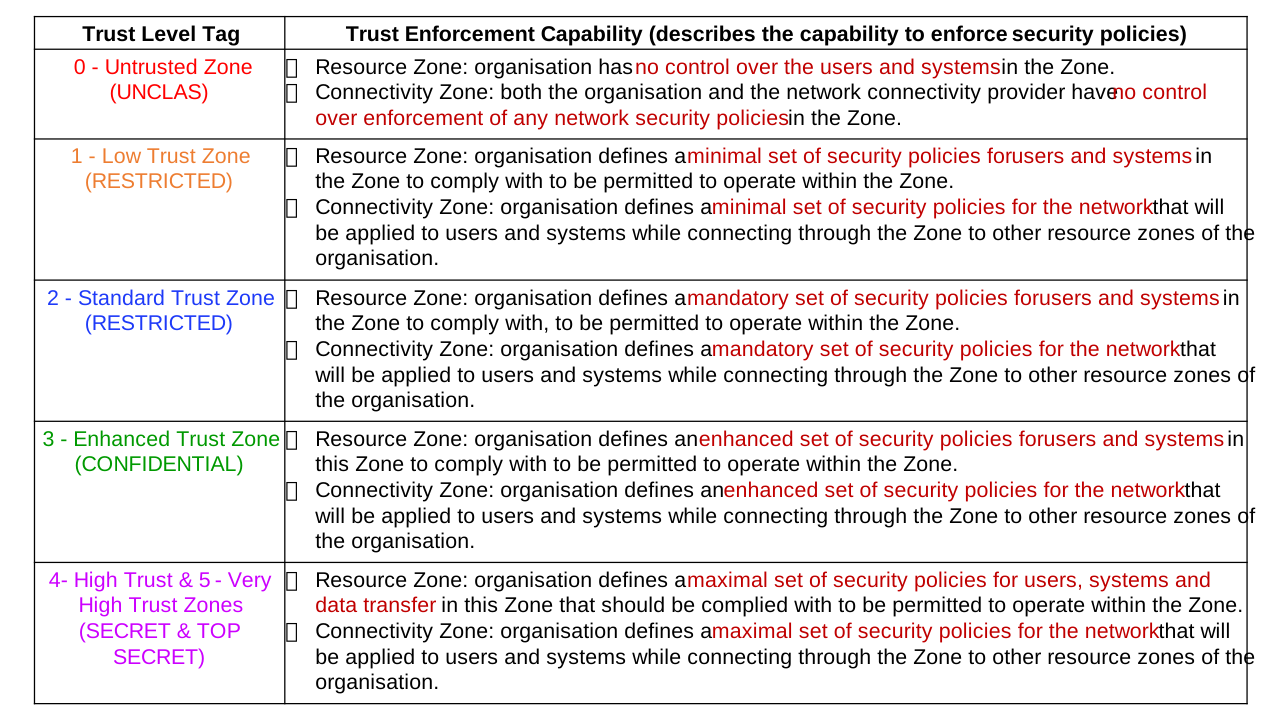
Categorisation of Zones based on Trust Levels
Each Resource and Connectivity Zone described above can be assigned a Trust Level. The characteristics of trust that is applicable to a resource or connectivity is described below along with examples of the same.
Every computer resource has to:
- be configured for functionality, performance, and assurance (controls)
- provide visibility and observability.
- be controlled.
- be governed through org policies.
The trust level is a function of the ability of an entity to execute the above requirements.
Characteristics of Trust Levels
Untrusted Zone
Characteristics:
When applied to a Resource Zone, it indicates that the organisation has no control over the users and systems in the Zone.
When applied to a Connectivity Zone, it indicates that both the organisation and the network connectivity provider have no control over enforcement of any security policies in the Zone.
Applicable to:
Public users and systems connecting through public networks. The organisation cannot enforce security policies on the users and systems. Neither the organisation nor the ISP can enforce any security policies for network traffic that passes through the public network.
Examples:
Public users anonymously accessing an organisation’s website over the Internet or mobile network.
Low Trust Zone
Characteristics:
When applied to a Resource Zone, the organisation defines a minimal set of security policies that users and systems in the Resource Zone should comply with to be permitted to operate within the Zone. Typically, no anonymous access is provided, and all users and systems must be registered with an organisation, using their username & password or allocated API secret.
When applied to a Connectivity Zone, the organisation defines a set of security policies for the network that will be applied to users and systems while connecting through the Zone to other resource zones of the organisation. Typically, this would be in the form of VPNs controlled by the organisation or a trustworthy network connectivity provider, who has well defined network security policies for the Connectivity Zone.
Applicable to:
External users and systems that can connect to an organisation’s zone after pre-registration and through session-based authentication, they are also required to use browser-based (https) or client-based VPNs, which are controlled by the organisation and governed by the organisation’s security policies.
External users and systems of other Organizations connecting through trusted extranet connectivity providers.
Examples:
Public users connecting to an organisation’s website through the Internet or mobile network using a browser or app-based SSL VPN and further logging into their user account before doing any further activity.
Applications on the devices of public users and Organizations, which connect to an organisation’s API gateways by using registered API secrets.
NICNET and NKN based extranets that provide network interconnectivity between different Organizations. The network connectivity provider defines the set of security policies that the organisational users and systems should comply with when they are connected to the network.
Remote management and support provided by OEMs, System Integrators, Managed Service Providers (MSPs & MSSPs) from their support zones, which are governed by their own security policies. In these cases, the remote support providers either connect through VPN clients installed on their devices or there would be well-managed site-to-site VPNs between the customer and support provider Organizations.
Standard Trust Zone
Characteristics:
When applied to a Resource Zone, the organisation defines a mandatory set of security policies that users and systems in the Resource Zone should comply with, to be permitted to operate within the Zone. Typically, the organisation has mechanisms to verify that the systems are compliant to the mandatory set of policies (systems are patched, have anti-virus software with latest update, username and password are as per security policy etc) before they are permitted to access other Resource Zones.
When applied to a Connectivity Zone, the organisation defines a mandatory set of security policies for the network that will be applied to users and systems while connecting through the Zone to other resource zones of the organisation. Typically, these well-defined network security policies are implemented and continuously verified for compliance either by the organisation or by a trusted network connectivity provider.
Applicable to:
Internal users and systems of the organisation connecting through the organisation’s Intranet, which may be managed by the organisation itself or by trusted network connectivity providers.
Users and systems of different Organizations connecting through trusted network, all of which are governed by a common set of security policies.
Examples:
Organisation’s Intranet for its own users and systems.
INFINET, a Closed User Group network governed and secured by RBI.
Enhanced Trust Zone
Characteristics:
When applied to a Resource Zone, the organisation defines an enhanced set of security policies that users and systems in this Resource Zone should comply with to be permitted to operate within the Zone. Typically, the users and systems are in a Closed User Group (CUG) with extended control and monitoring of their activities.
When applied to a Connectivity Zone, the organisation defines an enhanced set of security policies for the network that will be applied to users and systems while connecting through the Zone to other resource zones of the organisation. Typically, this would be in the form of highly secure VPNs and well-defined network security policies that are implemented and continuously verified for compliance either by the organisation or by a trusted network connectivity provider.
In general, the resource zones connected through an enhanced trust connectivity zone should themselves have enhanced trust.
Applicable to:
Internal users and systems of the organisation operating within Closed User Groups.
Users and systems of different Organizations connecting through trusted network, all of which are governed by a common set of enhanced security policies.
Examples:
Organisation’s privileged users like system administrators managing the IT and OT resources.
Internal LANs for high security operations, systems, and network administration.
Some Government and Defence captive networks.
High Trust Zone
Characteristics:
When applied to a Resource Zone, the organisation defines a maximal set of security policies that users and systems in this Resource Zone should comply with to be permitted to operate within the Zone. The organisation also specifies physical security and access controls for this zone and usually enforces network airgap for high security. All activities in this zone are monitored closely for any policy violation.
When applied to a Connectivity Zone, the organisation defines an enhanced set of security policies for the network that will be applied to users and systems while connecting through the Zone to other resource zones of the organisation. Typically, this would be in the form of highly secure VPNs and well-defined network security policies that are implemented and continuously verified for compliance either by the organisation or by a trusted network connectivity provider. Data diodes may be used for one-way communication from/to lower trust zones.
In general, the resource zones connected through a high trust connectivity zone should themselves have high trust and vice versa.
Applicable to:
Internal high security users and systems of the organisation operating within Closed User Groups.
High security users and systems of different Organizations connecting through high trust network, all of which are governed by a common set of enhanced security policies.
Examples:
Some Government and Defence Organizations’ high security operations.
High trust zones for ensuring the integrity and privacy of critical databases, such as Aadhaar demographic data, PKI infrastructure, HSMs etc.
Very High Trust Zone
Characteristics:
When applied to a Resource Zone, the organisation defines a maximal set of security policies that users and systems in this Resource Zone should comply with to be permitted to operate within the Zone. The organisation also specifies physical security and access controls for this zone and always enforces network airgap for high security. All activities in this zone are monitored closely for any policy violation.
When applied to a Connectivity Zone, the organisation defines a maximal set of security policies for the network that will be applied to users and systems while connecting through the Zone to other resource zones of the organisation. Typically, this would be in the form of custom hardware-based VPNs and detailed network security policies that are implemented and continuously verified for compliance either by the organisation or by a trusted network connectivity provider. Data diodes may be used for one-way communication from/to lower trust zones.
In general, the resource zones connected through a very high trust connectivity zone should themselves have very high trust and vice versa.
Applicable to:
Internal high security users and systems of the organisation operating within Closed User Groups.
High security users and systems of different Organizations connecting through high trust network, all of which are governed by a common set of enhanced security policies.
Examples:
Government and Defence Organizations’ very high security operations.
Very High trust zones for ensuring the integrity and privacy of extremely critical databases, such as Aadhaar biometric data, CCA and CA root certificates etc.
Using Trust Level Tags
The trust levels can be applied to various tags so as to establish a common understanding between different teams and organisational hierarchies. Examples are given below.
Data Centre and OT Zones
| Zone Type | Zone Description |
|---|---|
| DC Zone HL5 | Untrusted Resource Zone, Eg outside the external perimeter |
| DC Zone HL4.5, HL3.5 | Low Trust Resource Zone, Eg DMZ |
| DC Zone HL4, HL3, OT Zone HL3 | Standard Trust Resource Zone, hosting non-critical resources |
| OT Zone HL2.5, IIoT Edge Zone HL1 | Enhanced Trust Resource Zone, hosting critical operation and management resources |
| OT Operations Zone HL2, HL1, HL0 | High Trust Resource Zone, hosting critical OT supervisory and basic control systems and process systems that cannot be hardened to required extent |
Notes:
Data centre, remote/ branch office and cloud setups are typically segmented into multiple resource zones, each with its own trust level tag. Resource zones can be Operation zones or Management zones. Connectivity between DC zones is configured, secured & managed via DC networking infrastructure.
Colour tagged table of trust levels may be downloaded here.
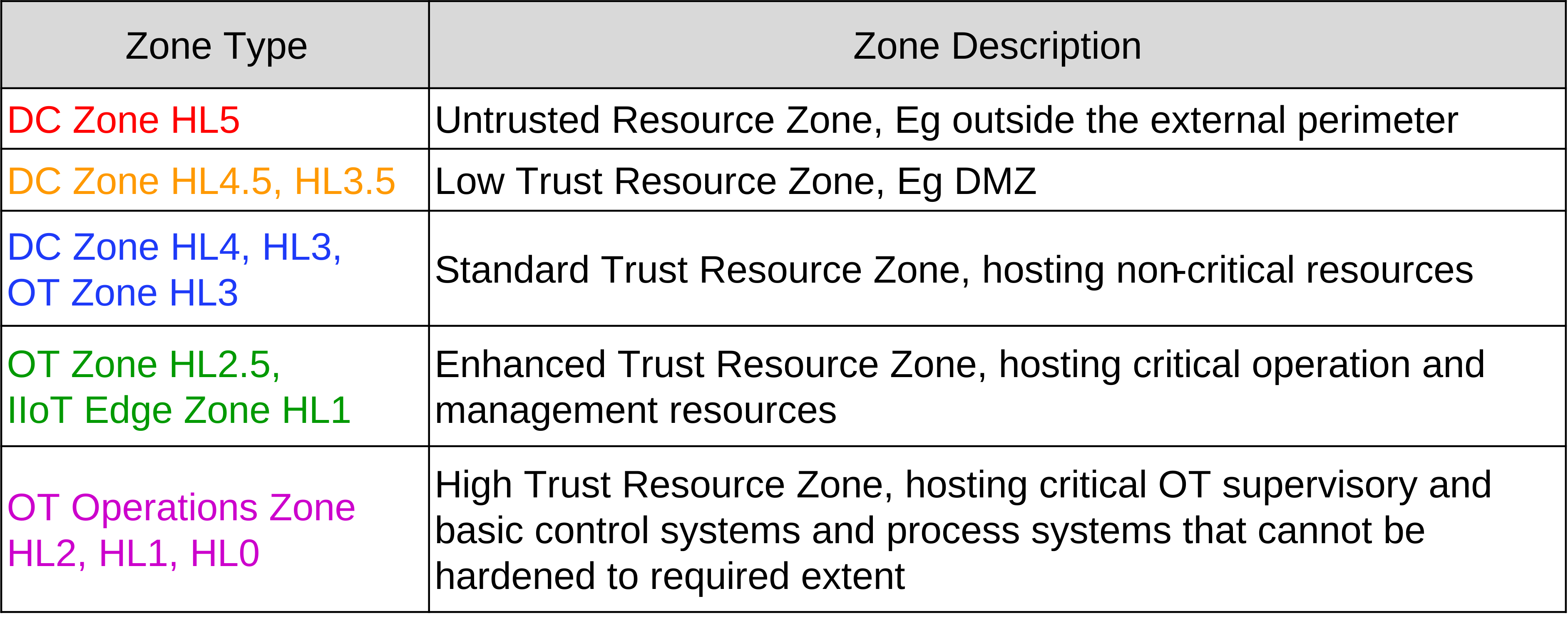
End User Zones
| Zone Type | Zone Description |
|---|---|
| End User UD, UC | Public Users (both humans and machines) |
| End User UB | Other Organisation Users (both humans and machines) |
| End User UA, OU | Own Organisation Users (both humans and machines) |
| End User UA, UB, OU | Privileged Users (Administrators, Service Accts, Remote Support etc) both human & machine |
Notes:
Resources in User zones are typically configured, secured, and managed by the organisation/ user owning the resource (user account and/ or device).
Colour tagged table of trust levels may be downloaded here.
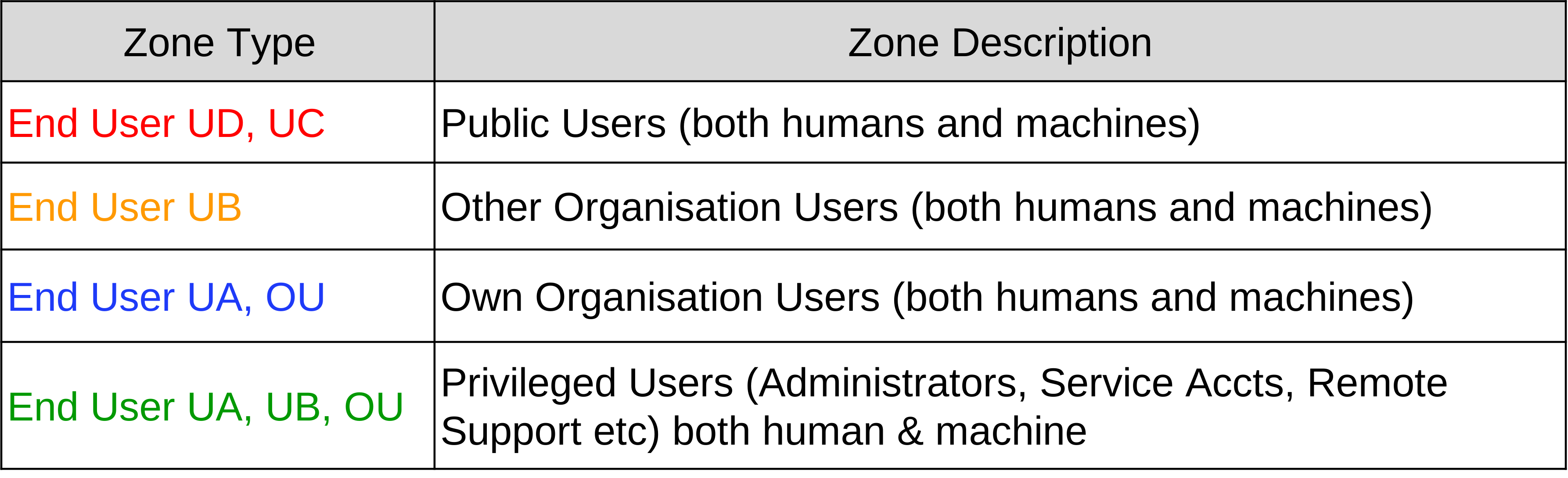
Connectivity Zones
| Zone Type | Zone Description |
|---|---|
| Connectivity VD, XD | Untrusted Connectivity Zone, Private owned, Public Internet |
| Connectivity VC, XC | Low Trust Connectivity Zone, Private owned, Extranet |
| Connectivity VB, XB | Standard Trust Connectivity Zone, GOE owned, Intranet, DC networking |
| Connectivity VA, XA | Enhanced Trust Connectivity Zone, Entity owned, Closed Group Network |
Notes:
A connectivity zone is typically configured, secured, and managed by the network provider, data centre provider or, in some cases, by the organization.
Colour tagged table of trust levels may be downloaded here.

Perimeter between Trust Zones
Perimeter tags defined below are in the context of separation between trust zones (tagged with the higher trust zone)
| Tag | Tag Description |
|---|---|
| PTL1 | Ingress into/ egress from a low trust zone |
| PTL2 | Ingress into/ egress from a standard trust zone |
| PTL3 | Ingress into/ egress from an enhanced trust zone |
| PTL4 | Ingress into/ egress from a high trust zone |
| PTL5 | Ingress into/ egress from a very high trust zone |
It may be noted that Critical Information Infrastructure (CII) of entities should typically be in Resource zones with trust levels TL3, TL4 or TL5. Also, they should never be connected directly through a Connectivity Zone with trust level TL0.
Perimeters between zones with different trust levels should implement security policies that are aligned with the required trust levels of the separated zones.
Colour tagged table of trust levels may be downloaded here.
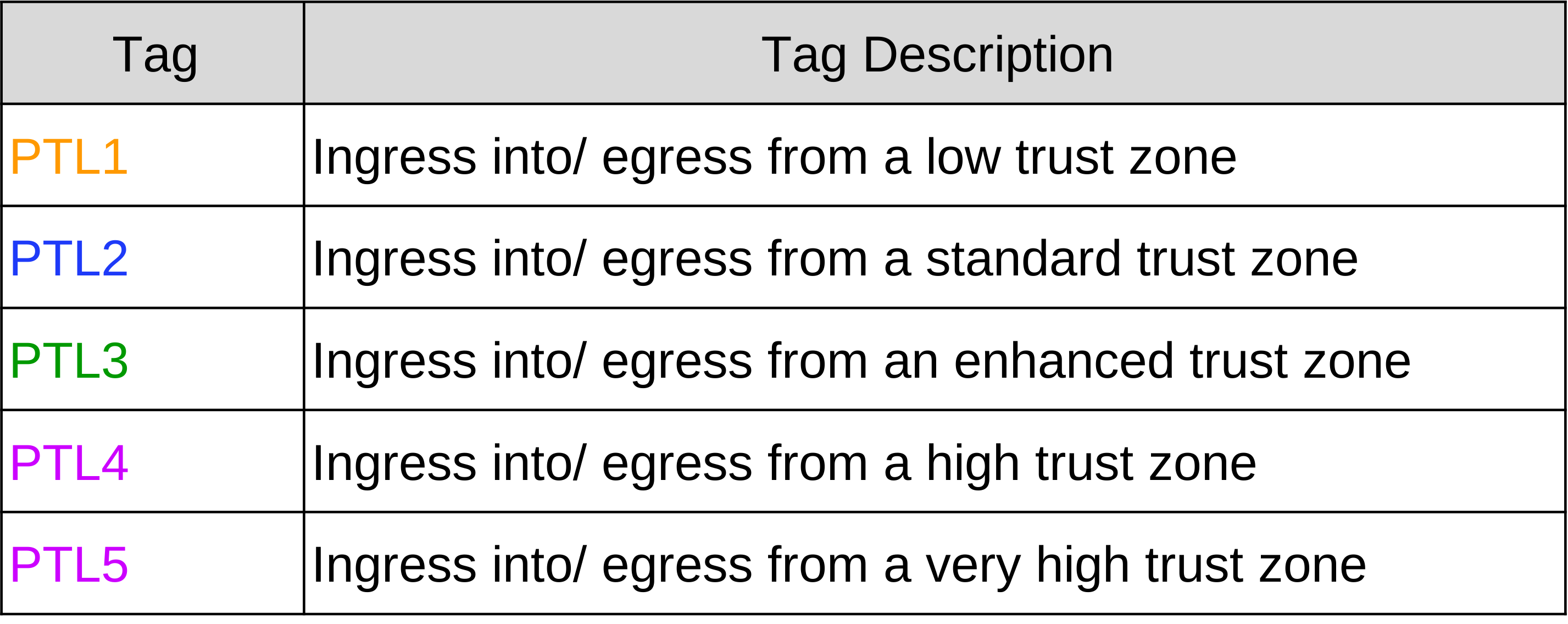
Mapping Trust Levels to Government Classification
The Ministry of Home Affairs has defined the following security classification tags:
- Top Secret: Information, unauthorized disclosure of which could be expected to cause exceptionally grave damage to the national security or national interest. This category is reserved for nation’s closest secrets and is to be used with great reserve.
- Secret: Information, unauthorized disclosure of which could be expected to cause serious damage to the national security or national interest or cause serious embarrassment in its functioning. This classification should be used for highly important information and is the highest classification normally used.
- Confidential: Information, unauthorized disclosure of which could be expected to cause damage to the security of the organisation or could be prejudicial to the interest of the organisation or could affect the organisation in its functioning. Most information, on proper analysis, will be classified no higher than confidential.
- Restricted: Information, which is essentially meant for official use only and which would not be published or communicated to anyone except for official purpose.
- Unclassified: Information that requires no protection against disclosure. e.g. public releases.
Government organisations may want to establish a standardised mechanism to map classification tags to trust levels of resource and connectivity zones in government IT infrastructure. A sample mapping is illustrated below:
| # | Zone Type | Trust Level of Resource Zone | Govt Data Classification |
|---|---|---|---|
| 0 | UD, NU | Untrusted | UNCLASSIFIED |
| 1 | UC, NU, HL4.5, HL3.5 | Low Trust | RESTRICTED |
| 2 | UB, NU, OU | Standard Trust | RESTRICTED |
| 3 | UA, NU, OU, L4, L3, L2, L1, L0 | Enhanced Trust | CONFIDENTIAL |
| 4 | UA, UB, SA, SB, OU | High Trust | SECRET |
| 5 | UA, SA, OU | Very High Trust | TOP SECRET |
| # | Zone Type | Trust Level of Connectivity Zone | Govt Data Classification |
|---|---|---|---|
| 0 | VC, VD, XD | Untrusted | UNCLASSIFIED |
| 1 | VC, VD, XC | Low Trust | RESTRICTED |
| 2 | VA, VB, VC, VD, XB | Standard Trust | RESTRICTED |
| 3 | VA, VB, VC, VD, XB | Enhanced Trust | CONFIDENTIAL |
| 4 | VA, VB, WA, XA, WA Use of Data Diode | High Trust | SECRET |
| 5 | VA, WA, XA, WA Use of Air Gap, Data Diode | Very High Trust | TOP SECRET |